Certification
A certified snippet is one that somebody with write access has read and stood behind, and the seal beside it says which.
The seal
A snippet's review state is one of five:
Certified— somebody certified this text and the certification has not lapsed.Needs review— no certification currently stands on it: nobody ever certified it, or its text was saved, its flag cleared, or it was sent back to be read again.Needs correction— a member flagged the text as wrong.Review expired— it was certified and its review window has passed.Moved— a document row only, where that row pins a revision behind the snippet's current one.
The state is derived on every read rather than stored, so no two surfaces disagree: the
tree row, the canvas row, the editor's Review band, the worklist and the export
pre-flight. Canvas rows, worklist rows and the band print the word; a tree row shows a
square in the state's colour, with the word on its hover title and in the row's
accessible name.
Certifying
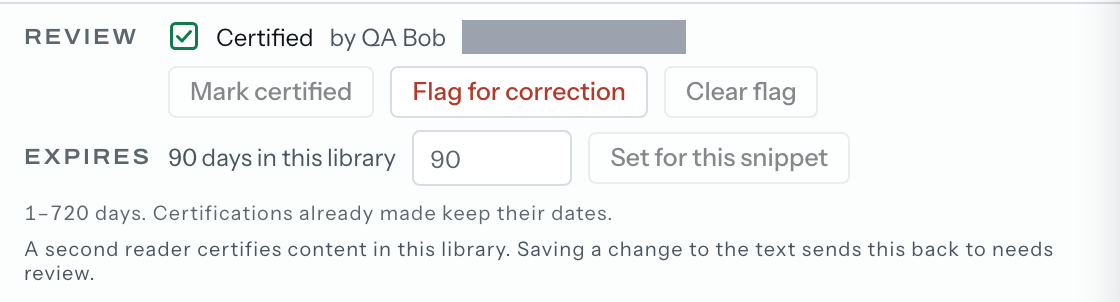
Mark certified is in the editor's Review band and in a snippet's row menu. It needs
write access in the workspace, which means a curator or an admin.
It is accepted from Needs review and Review expired only. On a flagged snippet the
control is already off and says why — Clear the flag first — a flagged snippet has to be read again. — so a correction is read before it carries a seal again.
The press records who certified it, when, and an expiry computed from the review window.
The second reader
A library can require that whoever certifies a revision is not its author. The editor
says so before the press and names the two ways forward: another member who can write
there certifies it, or an admin turns the rule off in Settings → Reviews.
Requires: a Shared library. A Personal library always asks for a second reader, and nobody else can see it, so its snippets cannot be certified.
When a certification lapses
Settings → Reviews holds a Review window for each library — between 1 and 720 days,
or Never expires. A snippet can carry its own instead: the editor's Expires row has
Set for this snippet, and Use the library’s once the snippet has its own.
A change to a window governs the next certification; every expiry already written stays where it is.
Saving a change to a snippet's text sends it back to Needs review: the text somebody
certified is no longer the text on screen. Settings → Reviews states that under the
window it holds.
Nothing is hidden or pruned by a lapse. An expired snippet stays in the library, stays searchable, assembles and exports exactly as it did, because an expiry is a fact about the text and not a gate on it. A snippet flagged wrong is left out of Live Answers until the flag is cleared, and it still reads, assembles and exports.
Reviewing is how a lapsed snippet gets read again.